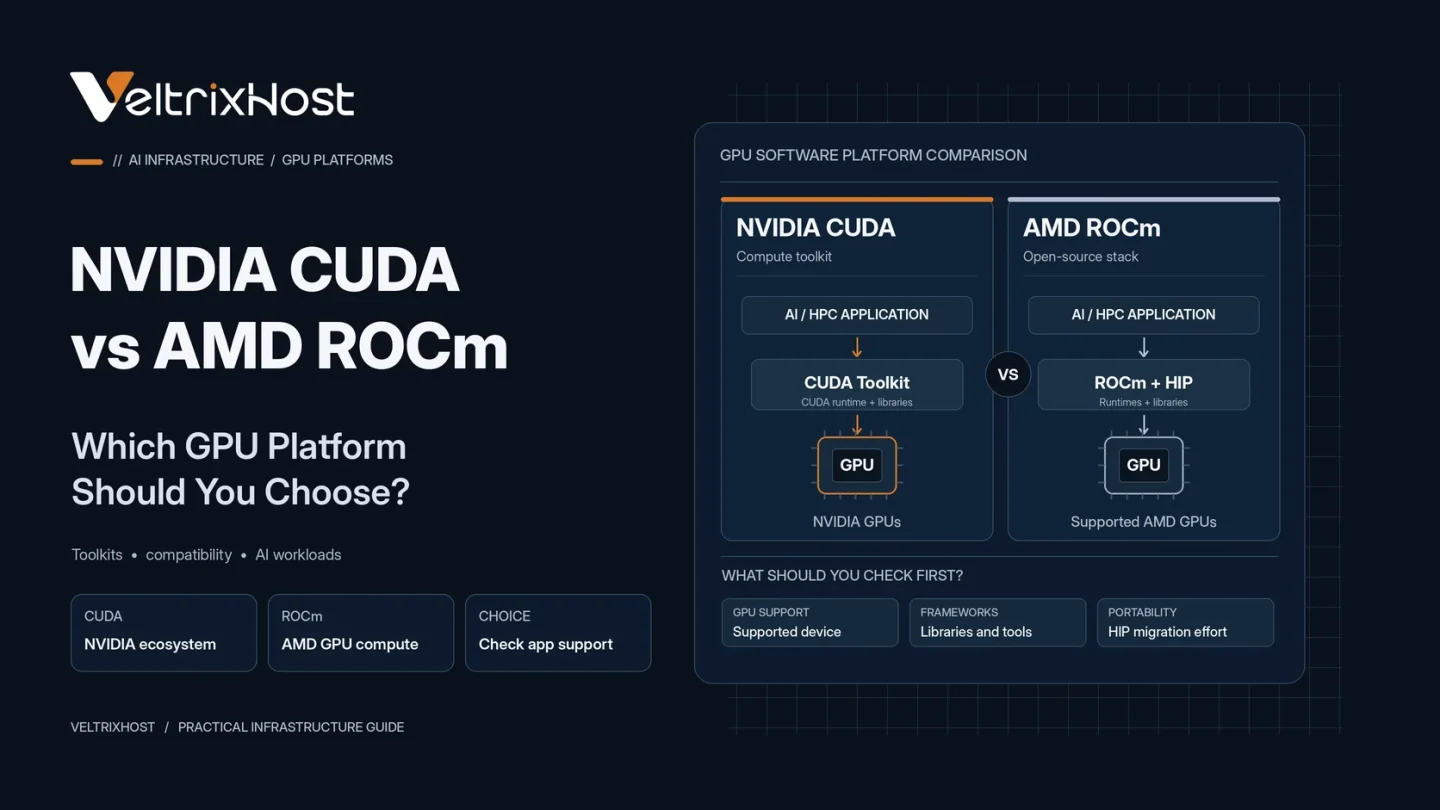
Choosing between NVIDIA CUDA vs AMD ROCm is an important decision when deploying AI models, machine learning applications, or high-performance computing workloads. Both platforms enable GPU-accelerated computing, but their software ecosystems, hardware support, and compatibility requirements differ.
The best choice depends on your applications, development environment, and GPU server budget.
What Is NVIDIA CUDA?
CUDA (Compute Unified Device Architecture) is NVIDIA’s parallel computing platform and programming model.
It allows developers to accelerate demanding applications using NVIDIA GPUs. CUDA includes compilers, development tools, and libraries for machine learning, scientific computing, and data processing.
Its established software ecosystem makes CUDA a practical choice for projects that depend on NVIDIA-specific libraries or optimized GPU kernels.
However, native CUDA workloads require compatible NVIDIA hardware.
What Is AMD ROCm?
ROCm (Radeon Open Compute) is AMD’s open software stack for GPU computing.
It provides compilers, libraries, debugging tools, and the HIP programming interface for developing accelerated applications.
ROCm supports selected AMD GPUs, including Instinct data center accelerators.
It also supports popular machine learning frameworks, although compatibility depends on GPU architecture, operating system, and software versions.
NVIDIA CUDA vs AMD ROCm: Key Differences
| Feature | NVIDIA CUDA | AMD ROCm |
|---|---|---|
| Primary hardware | NVIDIA GPUs | Supported AMD GPUs |
| Programming interface | CUDA | HIP |
| AI frameworks | Broad integrations | Supported integrations |
| GPU libraries | cuBLAS, cuDNN | rocBLAS, MIOpen |
| Platform support | NVIDIA ecosystem | GPU/OS-specific support |
| Migration | Native CUDA code | May require HIP porting |
| Best suited for | CUDA-dependent workflows | Compatible AMD deployments |
Which Is Better for AI and LLM Inference?
CUDA is often the more convenient option when using applications developed specifically for NVIDIA accelerators.
However, ROCm can run supported AI workloads on AMD Instinct hardware, including compatible PyTorch deployments.
For LLM inference, compare model support, precision formats, GPU memory, and inference engine compatibility.
Importantly, neither platform is automatically faster. Actual throughput depends on the accelerator, software optimizations, context length, and concurrent requests.
Can CUDA Applications Run on ROCm?
Some CUDA applications can be migrated using AMD’s HIP and HIPIFY tools.
However, code conversion is not always automatic. NVIDIA-specific libraries, unsupported functions, and custom kernels may require additional development.
Therefore, test compatibility before migrating production applications.
What Should You Check Before Choosing?
Start with these requirements:
- Software compatibility: Confirm framework and library support.
- GPU memory: Ensure your models and workloads fit available VRAM.
- Operating system: Check supported Linux distributions and drivers.
- Performance: Benchmark latency, throughput, and memory usage.
- Cost: Compare hardware pricing and migration effort.
AMD maintains an official ROCm compatibility matrix listing supported accelerator and software combinations.
Choosing a GPU Dedicated Server
Before purchasing, verify GPU availability, accelerator memory, CPU resources, storage, and deployment requirements.
You can explore VeltrixHost GPU Dedicated Servers, including available NVIDIA and AMD configurations.
Confirm CUDA or ROCm compatibility with your selected GPU before ordering.
Final Recommendation
In the NVIDIA CUDA vs AMD ROCm comparison, CUDA is a practical default for NVIDIA-dependent applications and established AI workflows.
ROCm is worth considering when compatible AMD hardware meets your performance and budget requirements.
Choose based on tested application compatibility rather than GPU brand alone.
FAQs
Is AMD ROCm better than CUDA?
Neither is universally better. CUDA offers broad software integrations, while ROCm supports compatible AMD GPU computing.
Does PyTorch support ROCm?
Yes. PyTorch supports selected ROCm configurations with compatible AMD GPUs.
Can ROCm run NVIDIA CUDA code?
Some CUDA code can be ported through HIP, but unsupported features may require manual changes.
Is ROCm suitable for LLM inference?
Yes, provided your chosen model, inference engine, GPU, and software versions are compatible.