TCP BBR is a congestion control algorithm designed to improve network throughput while limiting unnecessary queuing delays. For VPS owners transferring files, serving websites, or managing long-distance connections, it may improve performance without upgrading hardware.
However, BBR is not guaranteed to outperform your server’s existing configuration.
What Is TCP BBR?
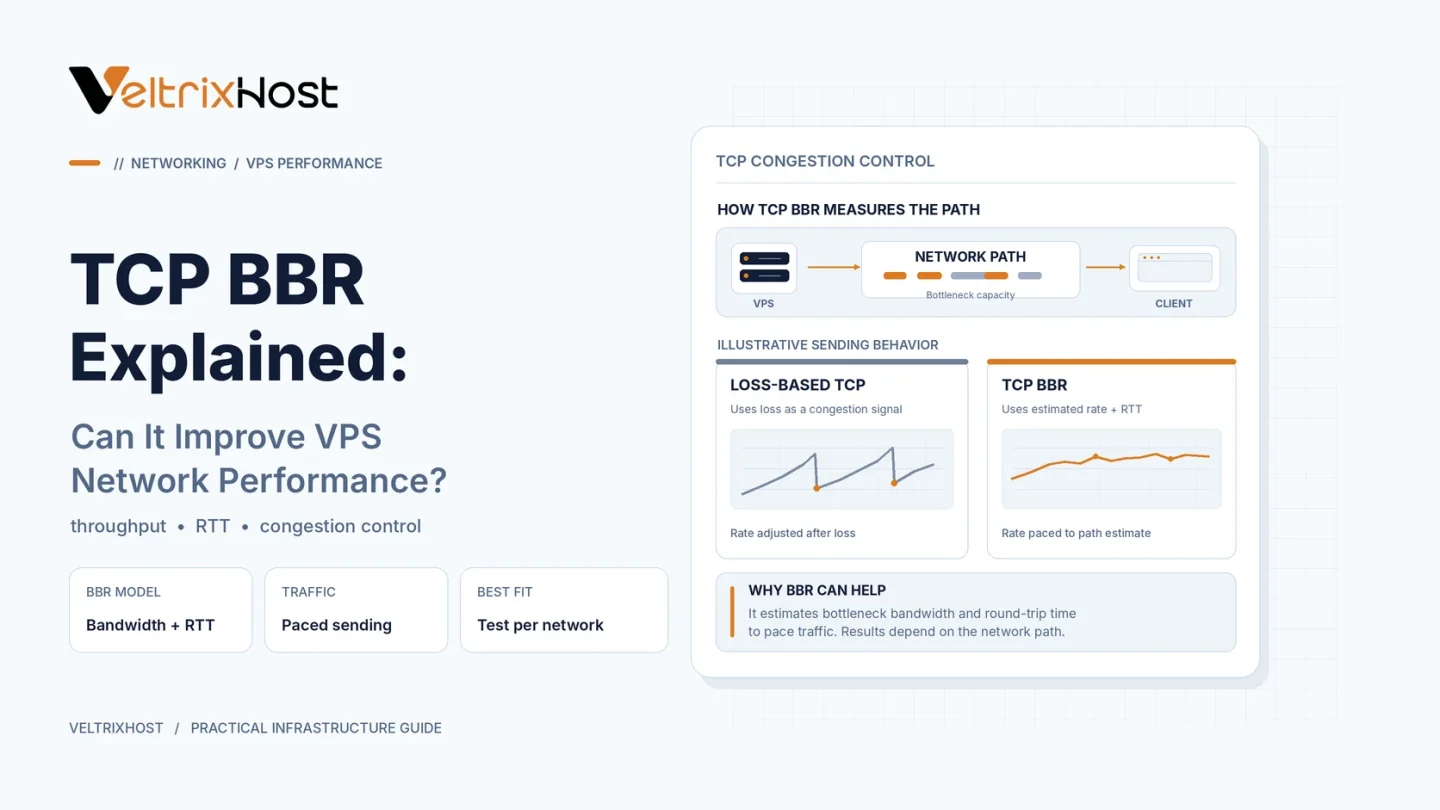
BBR stands for Bottleneck Bandwidth and Round-trip propagation time. Developed by Google, it estimates how quickly a network path delivers data and how long packets take to travel.
It then adjusts the TCP sending rate to use available bandwidth without continuously filling network queues.
BBR is available in supported Linux kernels and can be configured on VPS environments that permit kernel networking changes.
TCP BBR vs CUBIC: Key Differences
CUBIC, widely used on Linux, primarily adjusts its congestion window in response to network congestion and packet loss.
BBR instead models delivery rate and round-trip time to guide transmission.
| Feature | TCP BBR | TCP CUBIC |
|---|---|---|
| Main approach | Bandwidth and RTT estimates | Congestion-window adjustment |
| Transmission | Rate pacing | Window-based control |
| Long-distance transfers | Can improve throughput | Performance varies |
| Queuing delays | Can reduce buffer buildup | Depends on network conditions |
| Best choice | Requires benchmarking | Reliable established option |
Neither algorithm performs best under every network condition.
When Can TCP BBR Improve VPS Performance?
Long-Distance File Transfers
BBR may help servers transfer data more efficiently across high-latency connections, particularly when occasional packet loss reduces throughput.
Websites and Download Servers
When a VPS sends substantial TCP traffic, BBR may improve transfer consistency and reduce queuing delays.
However, website speed also depends on application processing, caching, storage, and visitor location.
Streaming and Application Traffic
BBR can benefit compatible TCP-based delivery. However, changing Linux TCP congestion control does not automatically optimize UDP traffic or applications using QUIC.
How to Enable TCP BBR on Linux
First, check available congestion control algorithms:
sysctl net.ipv4.tcp_available_congestion_control
If BBR is available, check the current setting:
sysctl net.ipv4.tcp_congestion_control
Then enable BBR temporarily:
sudo sysctl -w net.ipv4.tcp_congestion_control=bbr
This setting applies to new TCP connections.
You can inspect active connection statistics using:
ss -tin
Google’s official TCP BBR Quick-Start Guide provides additional technical guidance.
For sustained deployments, persist your settings through the appropriate Linux sysctl configuration.
What Should You Check Before Enabling BBR?
Confirm that your VPS kernel supports BBR and that you have permission to change network settings.
Then benchmark download speeds, throughput, retransmissions, and latency before and after enabling it.
Test during comparable network conditions. Also consider CPU limits, provider bandwidth restrictions, and routing quality.
Choosing a VPS for Network Performance
A fast VPS needs suitable CPU resources, RAM, storage, and network connectivity.
VeltrixHost Linux VPS Hosting offers root access and network connectivity for self-managed workloads. Verify kernel support before changing congestion control settings.
Final Recommendation
TCP BBR is worth testing when long-distance TCP transfers experience congestion-related slowdowns.
However, it does not increase your purchased bandwidth or replace proper server optimization.
Keep whichever congestion control algorithm delivers better results for your actual workloads.
FAQs
Is TCP BBR faster than CUBIC?
Sometimes. Results depend on latency, packet loss, network congestion, and workload characteristics.
Can BBR improve gaming latency?
Possibly for TCP traffic, but it does not directly optimize most UDP-based game traffic.
Does TCP BBR require a dedicated server?
No. It can work on a VPS with a compatible Linux kernel and sufficient networking permissions.