Choosing the right NVMe RAID configuration can improve server performance, storage availability, and fault tolerance. However, combining multiple NVMe drives does not automatically guarantee faster applications or complete data protection.
Whether you host databases, virtual machines, or business websites, understanding RAID levels helps you balance speed, capacity, and reliability.
What Is NVMe RAID?
NVMe RAID combines multiple NVMe solid-state drives into one logical storage array.
Depending on the RAID level, data can be distributed, mirrored, or protected using parity information.
NVMe drives already offer low latency and high throughput. RAID can increase aggregate performance or provide redundancy, but results depend on the controller, software, workload, and PCIe bandwidth.
NVMe RAID Levels Explained
RAID 0: Maximum Capacity and Speed
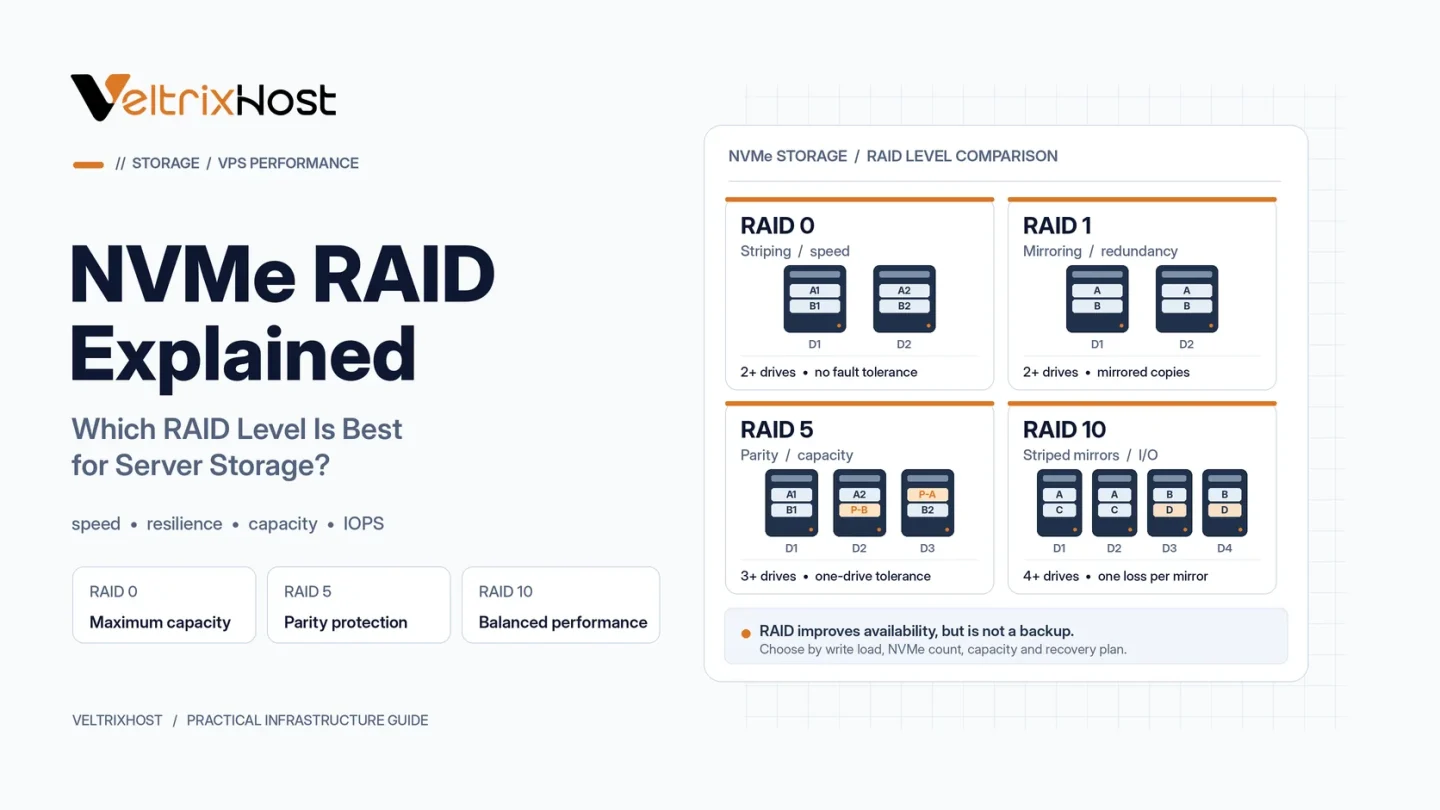
RAID 0 distributes data across multiple drives through striping.
It offers excellent performance potential and uses the combined storage capacity. However, it provides no redundancy. If one drive fails, the entire array’s data may become unusable.
Therefore, RAID 0 is unsuitable as the only storage protection for important production data.
RAID 1: Simple Mirroring
RAID 1 creates identical copies of data across drives.
A typical two-drive mirror survives one disk failure, but only half its total raw capacity remains usable.
This configuration works well for operating systems, smaller databases, and general-purpose hosting.
RAID 5 and RAID 6: Capacity Efficiency
RAID 5 distributes data and parity across at least three drives. It can survive one drive failure.
RAID 6 requires at least four drives and can survive two drive failures.
Both provide better capacity efficiency than mirroring in some configurations. However, parity updates introduce write overhead, particularly for small random writes.
RAID 10: Performance and Redundancy
Conventional RAID 10 combines mirrored drive pairs with striping.
It usually requires four drives and offers strong random I/O performance without RAID 5 or RAID 6 parity calculations.
RAID 10 is particularly attractive for demanding databases and virtualization environments.
NVMe RAID Comparison
| RAID Level | Typical Minimum Drives | Fault Tolerance | Best Use |
|---|---|---|---|
| RAID 0 | 2 | None | Temporary data |
| RAID 1 | 2 | One in a two-drive mirror | OS and websites |
| RAID 5 | 3 | One drive | Read-heavy storage |
| RAID 6 | 4 | Two drives | Capacity-focused storage |
| RAID 10 | 4 | Depends on mirrored pairs | Databases and VMs |
Which NVMe RAID Level Performs Best?
For write-intensive databases, RAID 10 often provides a strong balance of throughput and redundancy.
RAID 1 is simpler and economical for two-drive servers. Meanwhile, RAID 6 may suit larger arrays where capacity and two-drive fault tolerance matter more.
Consult the official Red Hat RAID documentation for configuration details.
Is NVMe RAID a Replacement for Backups?
No. RAID cannot protect against accidental deletion, ransomware, corruption, or complete server loss.
Maintain independent backups and regularly test restoration. Also monitor drive health, array status, and rebuild operations.
Choosing a Dedicated Server for NVMe RAID
Before ordering, confirm drive count, software or hardware RAID support, PCIe connectivity, and available storage capacity.
Explore VeltrixHost Dedicated Servers and verify NVMe and RAID options for your chosen configuration.
Final Recommendation
For most demanding production workloads, NVMe RAID 10 offers an attractive balance of performance and redundancy.
Choose RAID 1 for simpler deployments or RAID 6 when capacity efficiency and fault tolerance take priority.
Always benchmark real workloads and maintain separate backups.
FAQs
Is NVMe RAID faster than a single NVMe drive?
It can improve aggregate throughput and IOPS, depending on the RAID level and workload.
Is RAID 5 good for NVMe SSDs?
Yes, for suitable workloads, but parity operations can affect write performance.
Does RAID 10 protect against two drive failures?
Sometimes. Survival depends on which mirrored drives fail.
Can Linux manage NVMe RAID?
Yes. Linux supports software RAID through tools such as mdadm.