Understanding swap space on a VPS helps you manage memory usage and avoid unexpected application failures. Although RAM provides fast temporary storage, Linux can also use disk space when managing memory pressure.
However, swap is not a replacement for physical RAM. Knowing when to enable it can help you balance server stability, performance, and storage usage.
What Is Swap Space on a VPS?
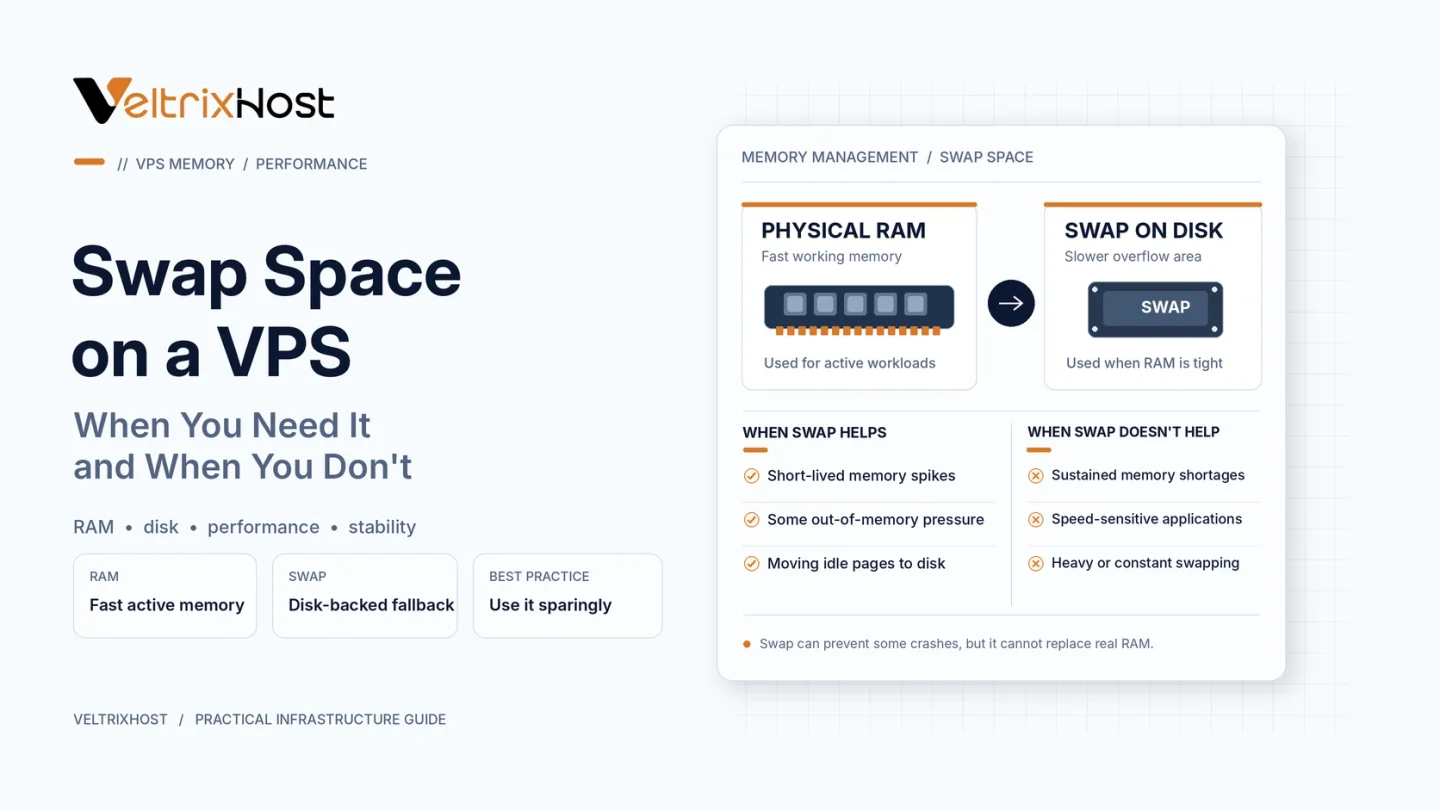
Swap space is disk-backed storage that Linux can use for memory pages that do not need to remain in RAM.
When memory pressure increases, the operating system may move less frequently accessed pages into swap, freeing RAM for other tasks.
Swap can provide additional flexibility during temporary memory spikes. However, accessing disk-backed swap is generally much slower than accessing RAM.
When Do You Need Swap Space?
Swap is particularly useful in several situations.
1. Small VPS With Limited RAM
A VPS with 1GB or 2GB RAM may occasionally experience memory pressure from background services, updates, or application processes.
A modest swap allocation can provide breathing room during temporary spikes.
2. Temporary Memory Usage Spikes
Software installations, scheduled tasks, and application deployments sometimes require additional memory.
Swap may prevent immediate memory exhaustion when demand briefly exceeds available RAM.
3. Background Applications
Some applications keep infrequently used memory pages allocated.
Linux can move suitable pages into swap, allowing RAM to support more active processes.
However, swap does not guarantee protection against out-of-memory errors.
When Should You Avoid Heavy Swap Usage?
Swap becomes problematic when applications continuously depend on it.
Database servers, busy websites, and latency-sensitive applications can experience serious slowdowns when memory pages repeatedly move between RAM and disk.
This condition is commonly called thrashing.
If your VPS constantly swaps during normal workloads, upgrading RAM or optimizing applications is usually more effective than increasing swap size.
Swap Space vs RAM: Key Differences
| Feature | RAM | Disk-Backed Swap |
|---|---|---|
| Speed | Very fast | Much slower |
| Storage type | Physical memory | SSD/NVMe disk |
| Main purpose | Active processing | Memory management |
| Performance | High | Workload-dependent |
| Best use | Applications and services | Occasional memory pressure |
How to Check Swap Usage on Linux
Before changing anything, inspect your current memory configuration.
Run:
free -h
This displays RAM and swap capacity.
To identify active swap devices, use:
swapon --show
For ongoing monitoring, run:
vmstat 1
Pay attention to the si and so columns, which show swap-in and swap-out activity.
A nonzero swap allocation alone does not necessarily indicate a problem.
What Is Linux Swappiness?
The vm.swappiness setting influences how Linux balances reclaiming file-backed memory against swapping anonymous memory pages.
Its optimal value depends on your workload and storage configuration.
The official Linux kernel swappiness documentation explains this behaviour.
Avoid blindly changing swappiness without measuring memory pressure and application performance.
Choosing a VPS With Enough RAM
Before relying on swap, estimate the memory requirements of your operating system, database, and applications.
You can compare RAM and storage options through VeltrixHost Linux VPS Hosting.
Select a plan that comfortably supports normal demand rather than depending on disk-based memory continuously.
Final Recommendation
Swap space on a VPS is useful as a safety margin for occasional memory pressure, especially on smaller servers.
However, sustained swapping is a warning sign. Monitor usage, optimize your applications, and upgrade RAM when necessary.
FAQs
Is swap necessary on every VPS?
No. Servers with sufficient RAM may operate without disk-backed swap, although a modest allocation can provide additional flexibility.
Does swap increase VPS RAM?
No. Swap provides disk-backed memory capacity, not additional physical RAM.
Is swap faster on NVMe storage?
NVMe can improve swap I/O performance compared with slower disks, but RAM remains significantly faster.
Can too much swap slow down a VPS?
Yes. Continuous swapping can increase latency and reduce application responsiveness.