Your VPS may feel slow even when its CPU usage looks normal. Websites respond slowly, applications hesitate, and background tasks take longer than expected.
One possible reason is VPS CPU steal time. This often-overlooked metric helps explain performance problems caused by competition for physical processor resources.
What Is VPS CPU Steal Time?
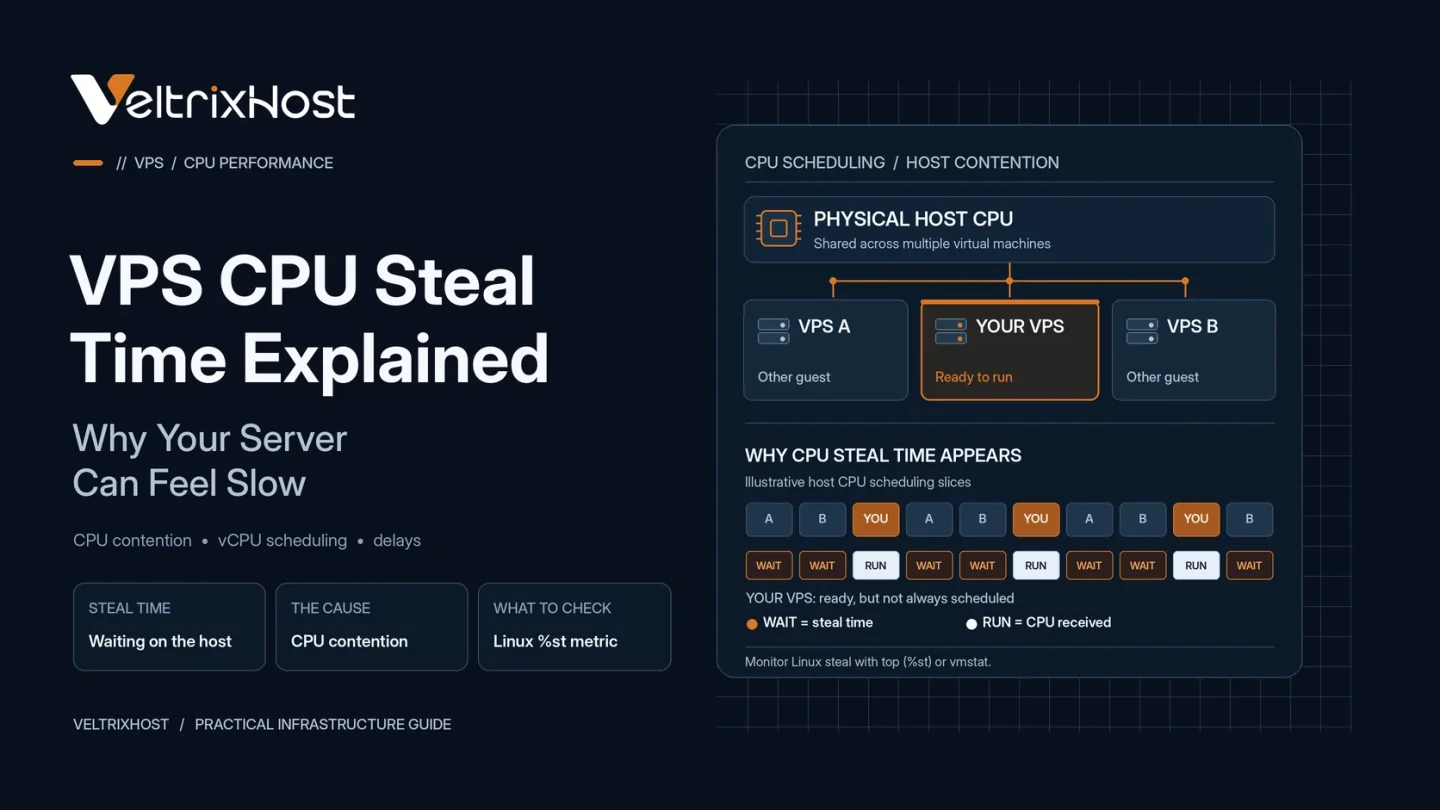
CPU steal time measures the time a virtual machine needs CPU resources but cannot run because its host is scheduling other work.
In VPS hosting, multiple virtual machines may share the same physical processor. Each receives virtual CPUs (vCPUs), but actual execution depends on the hypervisor’s scheduling.
When physical CPU resources become contested, your VPS may wait for processing time.
Linux reports this delay as steal time, commonly displayed as %st.
Why Does CPU Steal Time Happen?
Several infrastructure conditions can contribute to CPU contention:
- Oversubscribed hardware: Too many virtual CPUs compete for physical processing capacity.
- Busy neighboring VPS instances: Other virtual machines consume substantial CPU resources.
- Host-level workloads: Hypervisor services and maintenance tasks require processing time.
- CPU scheduling limits: Resource policies can restrict when virtual CPUs execute.
However, occasional steal time does not automatically indicate an overloaded server.
How to Check VPS CPU Steal Time
Linux provides several tools for monitoring CPU performance.
Run:
top
Look for the %st value in the CPU summary.
Alternatively, use:
vmstat 1
Check the st column while monitoring several intervals.
You can also run:
mpstat -P ALL 1
This command requires the sysstat package on many distributions.
For technical details, read Red Hat’s steal time accounting documentation.
What Is a Normal CPU Steal Time?
There is no universal percentage that guarantees good or bad VPS performance.
Consistently low steal time is generally desirable. However, sustained increases alongside slow application responses deserve investigation.
Focus on measurements collected during actual performance problems rather than isolated readings.
Also examine CPU usage, load averages, memory pressure, and disk I/O before identifying the cause.
CPU Steal Time vs High CPU Usage
These metrics describe different problems.
| Metric | What It Indicates |
|---|---|
| High CPU usage | Your VPS is executing CPU-intensive work |
| High steal time | Your VPS is waiting for host CPU scheduling |
| High I/O wait | Tasks are waiting on storage operations |
| High load average | Workload pressure, including runnable or uninterruptible tasks |
A VPS can experience noticeable delays even when its applications are not consuming excessive CPU resources.
How to Reduce CPU Steal Time
Start by measuring the problem during peak activity.
Optimize unnecessary processes and check whether your applications are genuinely CPU-bound.
If steal time remains high, contact your hosting provider with timestamps and monitoring results.
The provider may investigate host contention or recommend moving the VPS to another physical node.
Upgrading vCPU count alone does not guarantee improvement if host scheduling is the underlying problem.
When comparing VeltrixHost Linux VPS Hosting, review CPU allocations alongside RAM, storage, and workload requirements.
Final Recommendation
Understanding VPS CPU steal time helps separate application bottlenecks from virtualization-related performance issues.
Monitor trends, investigate competing resource constraints, and involve your provider when sustained contention affects performance.
FAQs
Is CPU steal time the same as CPU usage?
No. CPU usage measures processing activity, while steal time represents CPU execution time unavailable to the virtual machine.
Can CPU steal time slow WordPress?
Yes. Sustained CPU contention can delay PHP execution, database processing, and page generation.
Does adding more vCPUs fix steal time?
Not necessarily. The underlying physical host contention may remain.
Can I eliminate CPU steal time completely?
Not always. Occasional scheduling delays are possible in shared virtualized environments.