Choosing between NGINX vs Apache affects how your VPS handles website traffic, PHP applications, and server configuration. Both are mature, free web servers, but they solve some hosting problems differently.
The best option depends on your workload, control panel, technical experience, and available RAM.
What Is NGINX?
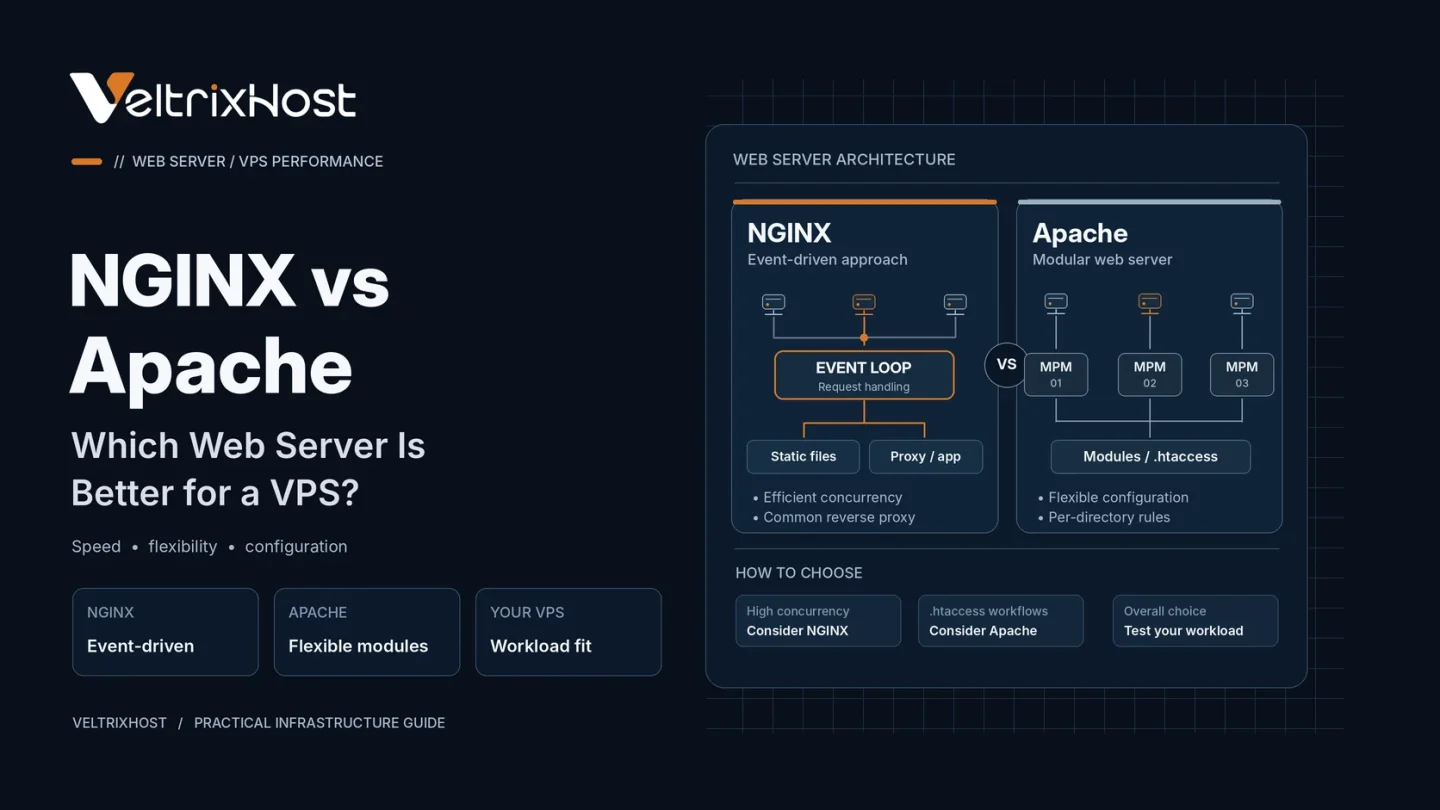
NGINX uses an event-driven architecture designed to manage many simultaneous connections efficiently. It commonly serves static files, terminates HTTPS, and acts as a reverse proxy for applications.
For example, NGINX can deliver images directly while forwarding PHP requests to PHP-FPM or Node.js requests to an application service.
Its centralized configuration is powerful, although beginners may need time to understand server blocks and location rules.
What Is Apache?
Apache HTTP Server is a highly configurable web server with an extensive module ecosystem.
It supports different multi-processing modules (MPMs), including the modern event MPM, which efficiently handles keep-alive connections. Therefore, calling Apache inherently slow or outdated is misleading.
Apache also supports .htaccess files when enabled. These allow directory-level rules without modifying the main server configuration, which is useful for familiar WordPress or shared-hosting workflows.
NGINX vs Apache: Key Differences
| Feature | NGINX | Apache |
|---|---|---|
| Connection handling | Event-driven workers | Configurable MPMs |
| Static content | Efficient delivery | Efficient when tuned |
| PHP support | Usually PHP-FPM | PHP-FPM or other handlers |
.htaccess rules | Not supported | Supported when enabled |
| Reverse proxy | Common strength | Supported through modules |
| Configuration | Centralized files | Centralized or per-directory |
Which Web Server Uses Less RAM?
NGINX often uses less memory under high connection counts, particularly for static content. However, Apache with event MPM and PHP-FPM can also be resource-efficient.
Actual consumption depends on worker limits, enabled modules, caching, PHP processes, and website traffic.
On a small VPS, measure the entire application stack rather than comparing idle web-server memory alone.
Which Is Better for WordPress?
Both can run WordPress successfully.
Apache can be convenient when a site relies on existing .htaccess rewrite rules or a hosting panel configured around Apache.
NGINX works well for WordPress with PHP-FPM and properly configured permalinks, caching, and redirects. However, Apache rewrite rules must be translated rather than copied directly.
For setup details, consult the official NGINX beginner’s guide.
Can You Use NGINX and Apache Together?
Yes. NGINX can sit in front as a reverse proxy, while Apache handles application requests behind it.
This arrangement can be useful for Apache-dependent applications, but running two servers adds maintenance and configuration complexity.
Which Should You Choose for a VPS?
Choose NGINX for a lightweight reverse-proxy setup, static assets, or an application stack you manage directly.
Choose Apache for established .htaccess workflows, compatible hosting panels, or applications requiring Apache-specific modules.
You can deploy either on VeltrixHost Linux VPS hosting, which provides self-managed KVM servers and full root access.
FAQs
Is NGINX always faster than Apache?
No. Results depend on workload, configuration, caching, and server resources.
Does NGINX support .htaccess?
No. Configure equivalent rules in NGINX configuration files.
Can both servers use HTTPS?
Yes. Both support TLS certificates and modern HTTPS configurations.
Is Apache suitable for a small VPS?
Yes. A carefully tuned Apache installation can run efficiently on modest resources.