Effective SMTP VPS monitoring helps prevent delayed password resets, missed invoices, and unnoticed mail-server abuse. A running SMTP service does not guarantee that messages leave its queue or reach recipient servers.
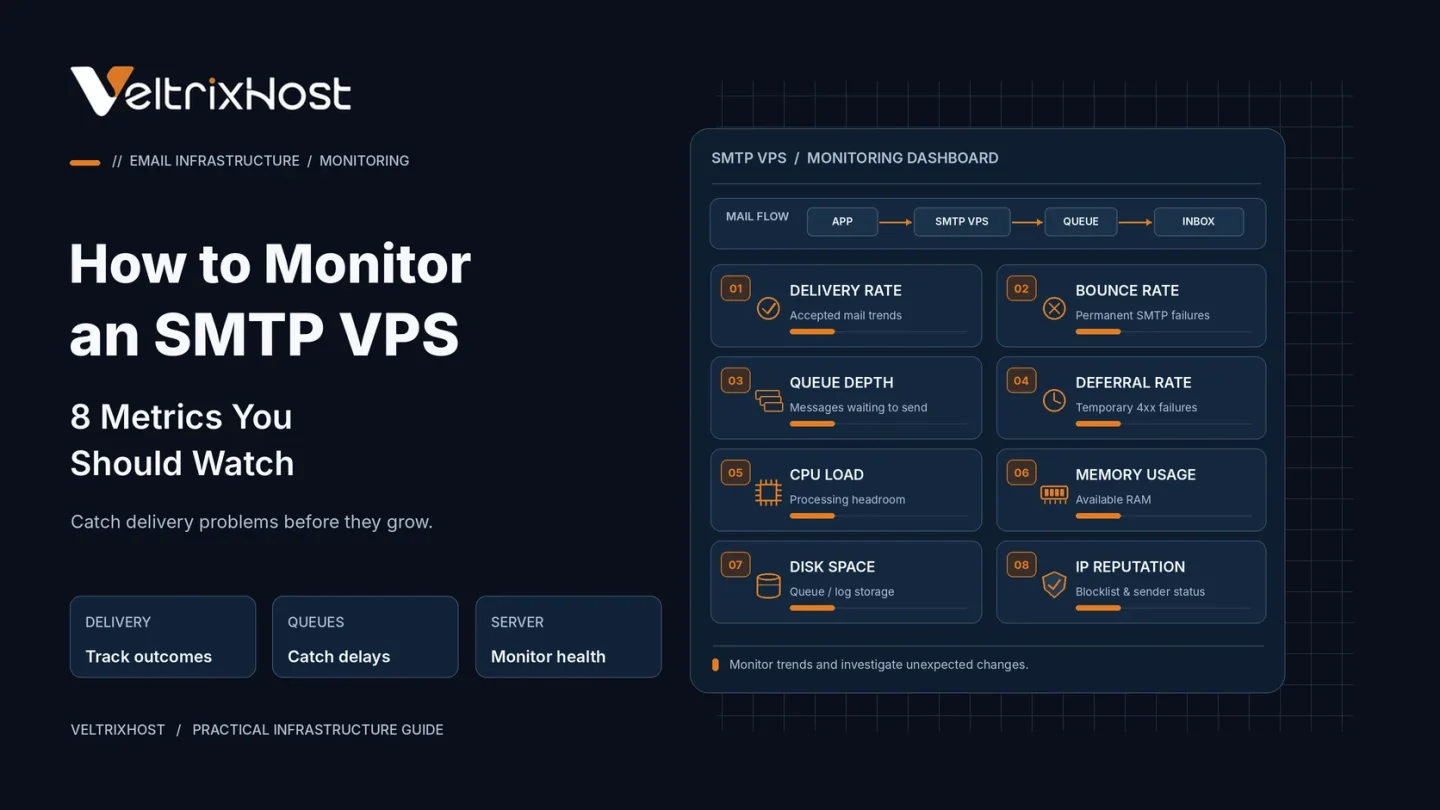
Monitor these eight metrics to identify problems before customers report them.
1. Queue Size and Message Age
Track how many emails remain queued and how long the oldest messages have waited. A small retry queue is normal; sustained growth signals a delivery bottleneck.
For Postfix, inspect the queue with:
postqueue -p
On supported Postfix installations, qshape deferred can reveal which recipient domains have the oldest delayed messages.
2. Successful Delivery Rate
Measure how many messages the next mail server accepts per minute or hour. Compare that number with your normal workload.
Remember that an SMTP 250 acceptance confirms the next server accepted responsibility—not that the email reached an inbox.
3. Temporary Failures and Bounces
Separate 4xx temporary deferrals from 5xx permanent rejections. Rising 4xx responses can indicate throttling or connectivity problems. Repeated 5xx responses may point to invalid recipients, authentication problems, or sending restrictions.
Inspect the full SMTP response before changing retry settings.
4. Outbound Sending Volume
Track message counts, concurrent connections, and unexpected sending spikes.
An unexplained increase may indicate a compromised website or stolen SMTP credentials. Consistent sending patterns also make legitimate delivery issues easier to identify.
5. SMTP Availability and TLS
Check that required ports are reachable from an external network. For authenticated submission, monitor Ports 587 and 465 where enabled.
Also track TLS handshake failures and certificate expiration. A responsive server may still reject clients if its certificate or authentication configuration is broken.
6. Authentication Failures
Watch failed SMTP login attempts and unusual source addresses. Repeated failures can indicate password guessing, outdated application credentials, or attempted abuse.
Alert on abnormal patterns, restrict relay permissions, and revoke compromised credentials promptly.
7. CPU, RAM, and Disk Usage
Monitor CPU saturation, available memory, disk space, and storage latency.
Full disks can stop mail queues and logging. If resource usage rises with deferred mail, investigate both infrastructure capacity and the original SMTP errors.
8. Sender Reputation and Complaints
Monitor blocklist listings, authentication results, delivery errors, and complaint trends. Google recommends keeping user-reported spam rates below 0.10% and avoiding 0.30% or higher.
Review its official email sender guidelines and use Postmaster Tools when enough Gmail sending data is available.
SMTP VPS Monitoring: Set Useful Alerts
Start with baselines rather than arbitrary universal thresholds. Alert when queues keep growing, normal delivery rates drop, disk space becomes scarce, or authentication failures spike.
Use controlled test messages to measure end-to-end delivery time. Review alerts after each incident to reduce noise.
For self-managed infrastructure, VeltrixHost SMTP VPS Hosting offers root access, dedicated IPv4, Port 25 access, and PTR/rDNS controls.
Final Recommendation
Effective SMTP VPS monitoring combines mail delivery metrics with security and server health. Check queue age, errors, sending patterns, and reputation—not just CPU graphs.
FAQs
How often should I monitor an SMTP VPS?
Collect key metrics continuously and review alerts daily. Critical transactional systems need prompt notifications.
Does an empty queue mean delivery succeeded?
No. It may mean messages were accepted, bounced, or removed. Inspect delivery logs.
Can monitoring improve inbox placement?
Monitoring detects reputation and configuration issues, but cannot guarantee inbox placement.