Choosing between IPv4 vs IPv6 for SMTP email affects how your mail server connects to receiving providers. Both protocols can deliver legitimate email, but their DNS requirements, connectivity, and reputation histories differ.
For most self-managed SMTP VPS deployments, a carefully tested dual-stack setup is more useful than switching exclusively to IPv6.
IPv4 vs IPv6 for SMTP Email: Key Differences
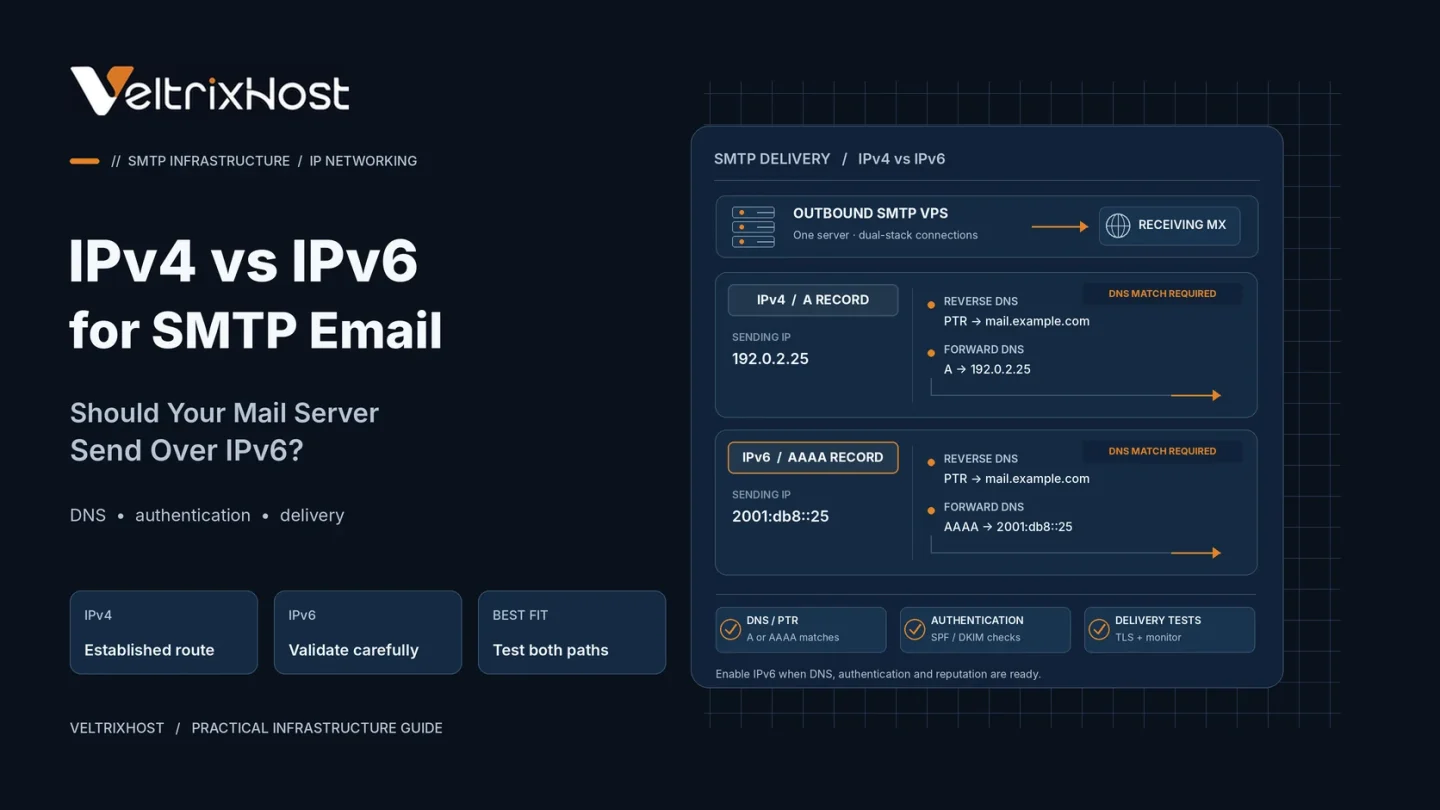
IPv4 uses 32-bit addresses, while IPv6 uses 128-bit addresses. Both can carry SMTP traffic, including direct server-to-server delivery over TCP Port 25.
An IPv6 allocation provides more address space. However, having additional addresses does not improve sender reputation or remove provider sending limits.
| Feature | IPv4 | IPv6 |
|---|---|---|
| Address space | Smaller | Much larger |
| SMTP support | Widely deployed | Supported by major providers |
| Reverse DNS | PTR and A records | PTR and AAAA records |
| IP reputation | Evaluated by receivers | Evaluated by receivers |
| Best approach | Established baseline | Test alongside IPv4 |
When Is IPv6 Worth Enabling?
IPv6 makes sense when your VPS has working IPv6 connectivity, the mail software supports it, and recipients accept SMTP over IPv6.
For example, Google and Microsoft operate IPv6-capable receiving infrastructure. Still, a receiver may apply different filtering or connectivity policies.
Keep IPv4 available so delivery does not depend on every destination accepting IPv6.
What Must You Configure Before Sending?
1. Match Forward and Reverse DNS
The sending IPv6 address needs a PTR record pointing to a hostname. That hostname must resolve through an AAAA record to the same IPv6 address.
Missing or mismatched records can lead to SMTP rejections.
2. Update Email Authentication
Authorize the actual sending address in SPF using the ip6: mechanism where appropriate. Enable DKIM signing and publish a DMARC policy with correct From-domain alignment.
Google explains these checks in its official email sender guidelines.
3. Verify Port 25 and Reputation
Test outbound IPv6 connectivity to recipient MX servers. Confirm firewall rules and provider policies permit delivery.
Monitor bounce codes, spam complaints, and sending reputation. Never assume a newly assigned IPv6 address is trusted automatically.
How to Check Your Postfix Configuration
On Linux, inspect the transport settings:
postconf inet_protocols smtp_address_preference
Postfix can use both protocols when inet_protocols permits them. Its address preference also influences outgoing connection attempts.
Test DNS with:
dig -x 2001:db8::25 +short
Replace the documentation address with your actual sending IPv6 address. Verify the returned hostname’s AAAA record.
Before enabling IPv6 in production, send test messages, inspect authentication results, and monitor deferred queues.
Choosing an IPv4 and IPv6 SMTP VPS
VeltrixHost SMTP VPS Hosting lists dedicated IPv4 addresses, IPv6 /64 allocations, root access, and PTR/rDNS controls.
Confirm IPv6 reverse-DNS management and outbound SMTP connectivity for your exact allocation before relying on IPv6 delivery.
Final Recommendation
For IPv4 vs IPv6 for SMTP email, start with a properly authenticated IPv4 configuration. Add IPv6 after validating DNS, connectivity, and delivery performance.
Dual-stack flexibility is valuable; verified mail delivery matters more than address availability.
FAQs
Does IPv6 improve email deliverability?
Not by itself. Reputation, authentication, content, and receiver policies still matter.
Can Postfix send email using IPv6?
Yes, when IPv6 networking and Postfix settings are correctly configured.
Should I disable IPv4 after enabling IPv6?
Usually not. Keeping IPv4 provides compatibility and an alternative delivery path.