Reverse DNS is an essential part of configuring a reliable mail server. Without a valid PTR record, receiving email providers may reject your messages or treat your sending infrastructure as suspicious.
Whether you run a dedicated SMTP server or an email VPS, understanding PTR/rDNS helps you prevent delivery problems and maintain a professional sending environment.
What Is Reverse DNS (PTR/rDNS)?
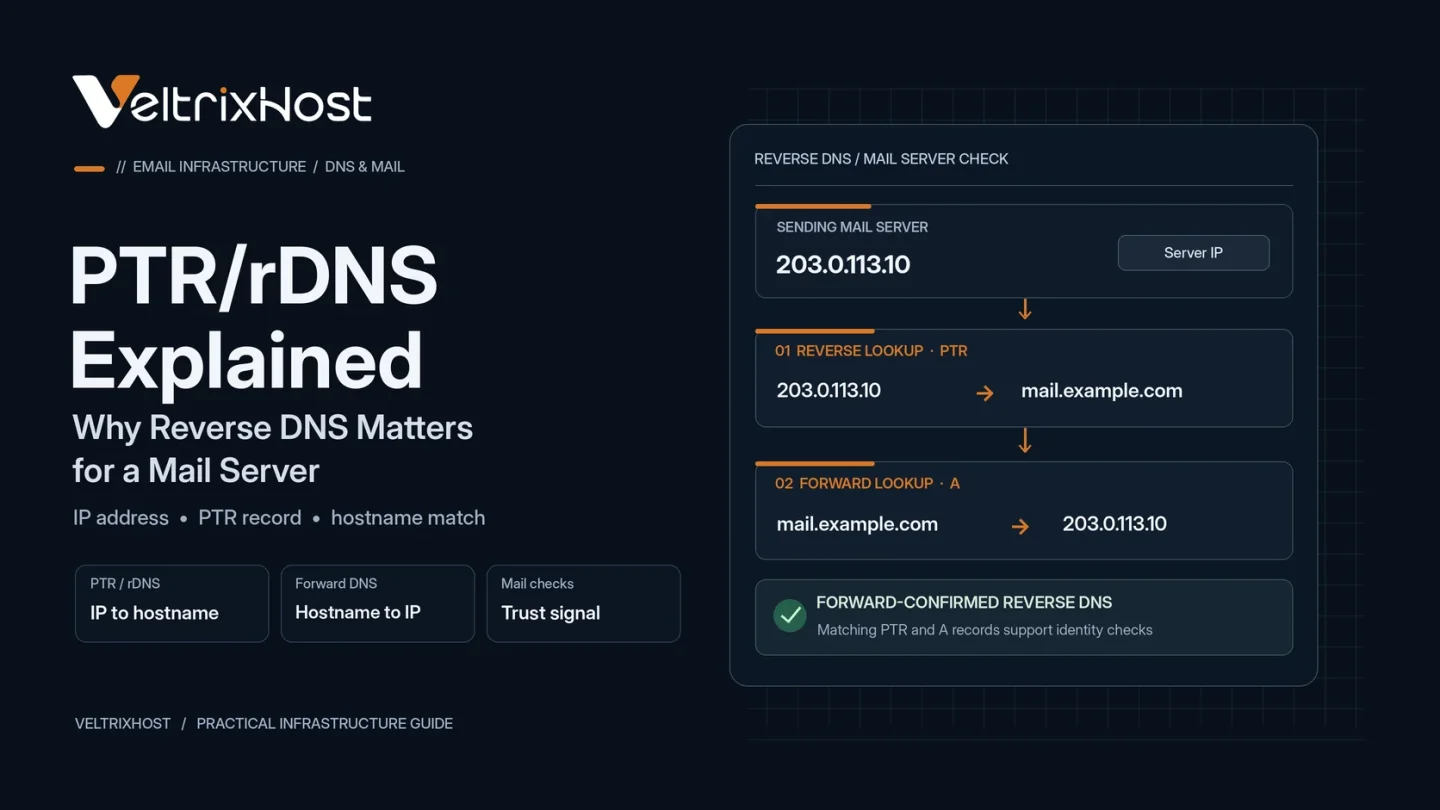
Reverse DNS, or rDNS, translates an IP address into a hostname using a Pointer (PTR) record.
Regular DNS performs the opposite lookup, connecting a hostname to an IP address.
For example:
- Forward DNS:
mail.example.com→192.0.2.10 - Reverse lookup:
192.0.2.10→mail.example.com
When the PTR hostname resolves back to the original IP, the configuration passes forward-confirmed reverse DNS (FCrDNS).
This consistency helps receiving servers validate your sending infrastructure.
Why Does Reverse DNS Matter for Mail Servers?
Receiving mail providers use DNS information to assess incoming SMTP connections.
Google requires valid forward and reverse DNS records for servers sending messages to Gmail accounts. Missing or incorrect records can therefore cause delivery failures.
However, a valid PTR record alone does not guarantee inbox placement. Email providers also evaluate sender reputation, message authentication, and spam complaints.
How to Configure Reverse DNS Correctly
Follow these five steps to configure your outgoing mail server:
- Choose a hostname: Use a fully qualified domain name such as
mail.example.com. - Create an A record: Point that hostname to your sending server’s IPv4 address.
- Set the PTR record: Configure your public IP to resolve to the same hostname.
- Check SMTP identity: Set an appropriate EHLO/HELO hostname in your mail software.
- Verify DNS: Confirm that the forward and reverse lookups resolve consistently.
For IPv6 sending addresses, configure appropriate AAAA and PTR records.
Your hosting provider usually controls the reverse DNS zone for its assigned IP addresses.
How to Check PTR Records on Linux
Use the following command to verify your server’s PTR record:
dig -x 192.0.2.10 +short
Then check its forward DNS:
dig mail.example.com A +short
Replace the example values with your actual server details.
The hostname returned by the first command should resolve to the sending IP. If it does not, correct the relevant records.
Common Reverse DNS Mistakes to Avoid
Several configuration mistakes can affect email delivery:
- Missing PTR records for outbound IP addresses.
- PTR hostnames without matching forward DNS.
- Incorrect or outdated DNS entries after server migration.
- Unverified IPv6 sending addresses.
- Missing SPF, DKIM, or DMARC authentication.
Additionally, avoid assuming that DNS configuration alone guarantees successful email delivery.
Choose an Email VPS With PTR Support
Before buying a mail server VPS, verify that your provider supports PTR management, dedicated IP addresses, and outbound SMTP traffic.
VeltrixHost SMTP VPS Hosting includes self-service PTR/rDNS management and Port 25 access for configuring your own mail infrastructure.
For additional requirements, review the official Google Email Sender Guidelines.
Final Recommendation
Configure reverse DNS before sending production email. Verify your hostname and IP records, then implement SPF, DKIM, DMARC, TLS, and sender reputation monitoring.
A properly configured PTR record helps establish trustworthy sending infrastructure and prevents avoidable DNS-related delivery problems.
FAQs
Is a PTR record required for email?
Major email providers, including Gmail, require valid reverse DNS for sending infrastructure.
Does reverse DNS improve deliverability?
It helps prevent DNS-related rejection, but sender reputation and email authentication also influence delivery.
Can I configure PTR in Cloudflare?
Usually not for a VPS IP. Your IP provider typically manages the reverse DNS zone.
How long do PTR changes take?
Updates may appear quickly, but DNS caching can delay visibility depending on record TTLs and provider processing.