Choosing between SMTP port 25 vs 465 vs 587 matters when configuring a mail server, WordPress notifications, or transactional email applications. Although all three ports support SMTP communication, they serve different purposes and use different encryption methods.
Using the wrong port can cause connection errors or prevent messages from reaching their destination.
What Is SMTP Port 25?
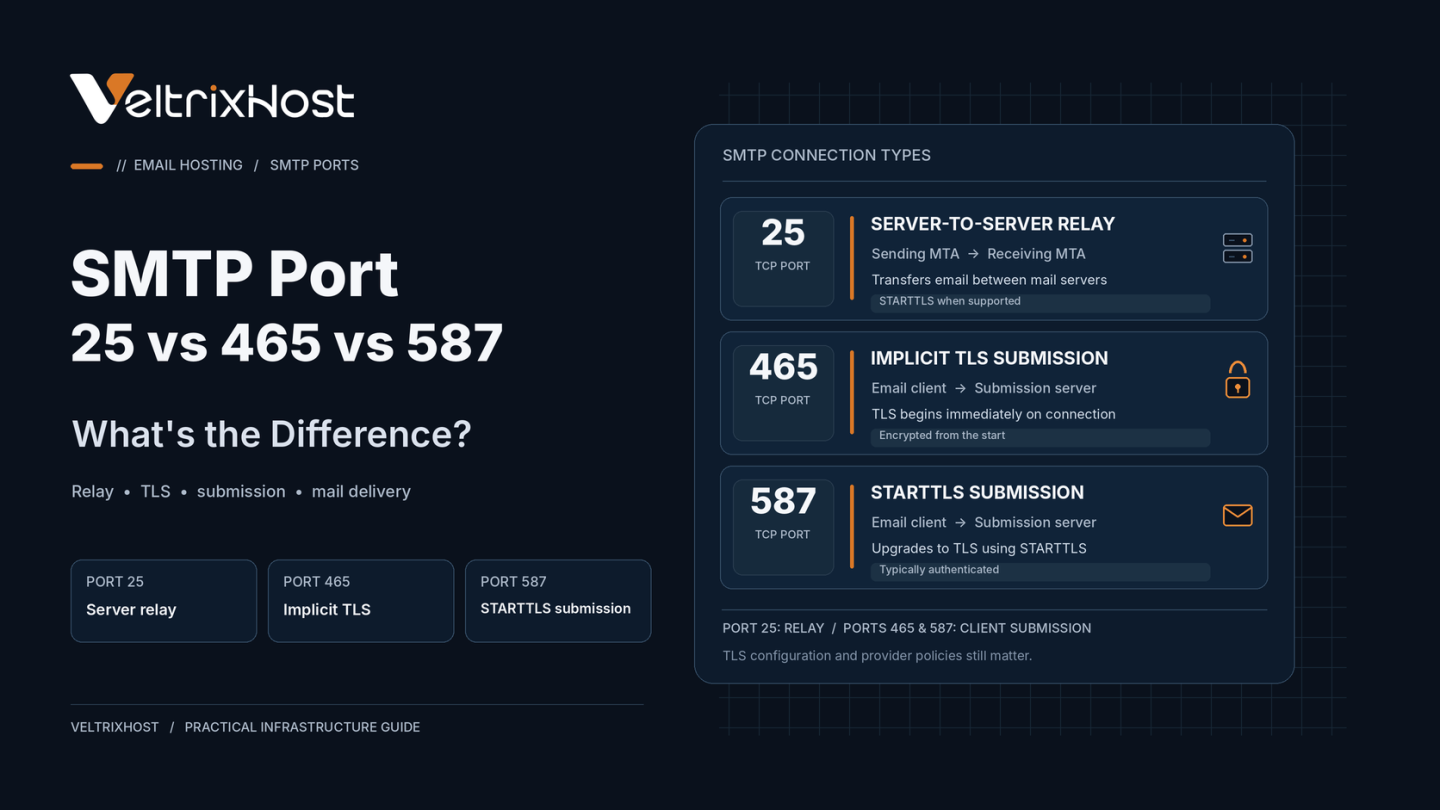
Port 25 is the standard connection for server-to-server email delivery.
When a sending mail server connects to a recipient domain’s mail exchanger (MX), it normally uses TCP port 25.
Servers may negotiate encryption through STARTTLS. However, encryption is not automatically guaranteed for every connection.
Many hosting providers restrict outbound Port 25 to reduce spam. Therefore, verify availability before deploying your own SMTP server.
What Is SMTP Port 465?
Port 465 supports authenticated email submission using implicit TLS.
The encrypted connection begins immediately, before SMTP commands are exchanged.
This makes Port 465 suitable for supported email clients and applications requiring encrypted SMTP submission.
Importantly, Port 465 is not obsolete. Modern email standards recognize it as a valid secure submission option.
What Is SMTP Port 587?
Port 587 is the standard email submission port for clients and applications.
It commonly uses STARTTLS to upgrade an established SMTP connection to encrypted communication.
For secure operation, configure your email client to require successful TLS negotiation and SMTP authentication.
When configured correctly, both Port 465 and Port 587 provide secure message submission.
SMTP Port 25 vs 465 vs 587: Key Differences
| Feature | Port 25 | Port 465 | Port 587 |
|---|---|---|---|
| Main purpose | Server relay | Email submission | Email submission |
| Encryption | STARTTLS when available | Implicit TLS | STARTTLS |
| Authentication | Relay-policy dependent | Typically required | Typically required |
| Typical use | Mail server to MX | Email clients | Apps and email clients |
| Provider restrictions | Common | Less common | Less common |
Which SMTP Port Should You Choose?
The correct port depends on how you send email.
- Self-hosted mail server: Use Port 25 for direct delivery to recipient mail servers.
- WordPress or applications: Use Port 587 with required STARTTLS when supported.
- Email clients: Use Port 465 with implicit TLS or Port 587 with STARTTLS, following provider instructions.
Neither Port 465 nor Port 587 replaces Port 25 for ordinary direct delivery to external MX servers.
The official IETF secure email submission standard recognizes both encrypted submission methods.
How to Test SMTP Port Connectivity
On Linux, test STARTTLS using:
openssl s_client -starttls smtp -connect mail.example.com:587
For implicit TLS, run:
openssl s_client -connect mail.example.com:465
Replace the hostname with your SMTP server.
A successful TLS connection confirms connectivity, not necessarily successful authentication or message delivery.
Choosing an SMTP VPS With Port 25 Open
Before deploying a mail server, verify outbound SMTP connectivity, dedicated IP availability, PTR/rDNS support, and firewall configuration.
VeltrixHost SMTP VPS Hosting provides Port 25 access, root administration, and PTR/rDNS management for self-managed mail servers.
Final Recommendation
Use Port 25 for server-to-server email delivery, Port 587 for STARTTLS submission, and Port 465 for implicit TLS submission.
Always require encryption and authentication for client submission. Additionally, configure SPF, DKIM, DMARC, and reverse DNS to support reliable delivery.
FAQs
Is SMTP Port 465 outdated?
No. Port 465 remains a recognized option for secure email submission using implicit TLS.
Is Port 587 more secure than 465?
Not inherently. Both can provide strong security when TLS is correctly configured.
Does WordPress require Port 25?
No. WordPress can submit email through an SMTP provider using Port 465 or 587.
Why do VPS providers block Port 25?
Some providers restrict outbound Port 25 to reduce spam and abuse from compromised servers.