Choosing ECC RAM for dedicated servers can make a difference in reliability and data protection. While ordinary memory handles everyday computing tasks, Error Correcting Code (ECC) memory adds protection against certain types of data corruption.
However, not every dedicated server requires ECC memory. The right choice depends on your workload, hardware compatibility, and tolerance for unexpected errors.
What Is ECC RAM?
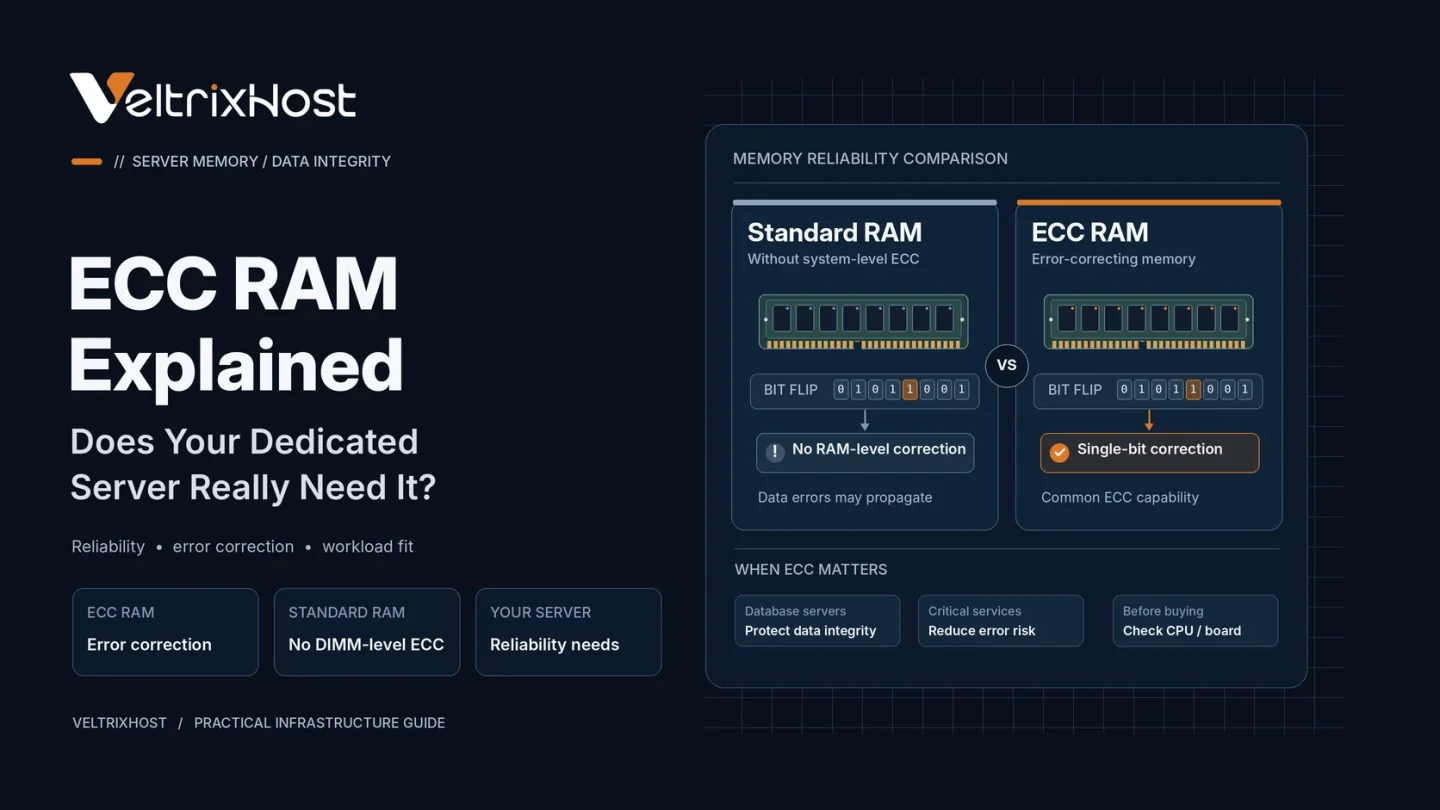
ECC RAM stands for Error Correcting Code Random Access Memory. It uses additional error-checking information to detect and correct certain memory errors during operation.
For example, a standard server ECC configuration can correct single-bit errors and detect many multi-bit errors.
These errors may result from electrical interference, hardware degradation, or other physical conditions.
Unlike ordinary RAM, ECC memory helps prevent some corrupted data from reaching running applications.
How Does ECC RAM Work?
When information enters memory, the system generates error-checking bits alongside the original data.
During reading, the memory controller checks these bits to identify inconsistencies.
If a correctable error occurs, the system can repair the affected data automatically. Uncorrectable errors may trigger warnings or system failures.
According to Kingston’s ECC memory guide, proper ECC operation requires compatible memory, processor support, and motherboard capabilities.
ECC RAM vs Non-ECC RAM: Key Differences
| Feature | ECC RAM | Non-ECC RAM |
|---|---|---|
| Error detection | Supported | No equivalent system-level ECC |
| Error correction | Supported errors | Not supported |
| Data integrity | Additional protection | Standard protection |
| Hardware support | Compatible platforms required | Widely supported |
| Cost | Usually higher | Usually lower |
| Best suited for | Critical workloads | Less critical workloads |
ECC memory improves reliability, but it does not automatically increase processing speed.
When Does Your Dedicated Server Need ECC RAM?
ECC memory is especially valuable for workloads where data accuracy and uptime matter.
1. Database Servers
Databases continuously process information in memory. ECC helps reduce the risk of certain memory errors affecting transactions and stored data.
2. Virtualization and VPS Hosting
A virtualization server may host many virtual machines simultaneously.
Therefore, an uncorrected memory error could affect multiple workloads rather than one application.
3. Business-Critical Applications
Financial systems, enterprise applications, and scientific computing environments may benefit from additional memory error protection.
4. Continuous Server Operations
Servers operating around the clock can benefit from hardware error reporting and correction.
However, ECC cannot prevent every crash or hardware failure.
When Is Non-ECC RAM Enough?
Non-ECC RAM may be reasonable for development environments, temporary test servers, and noncritical applications.
However, production databases and virtualization environments generally justify the additional protection provided by ECC.
Consider the consequences of corrupted data or unexpected downtime before prioritizing lower hardware costs.
Does ECC RAM Affect Server Performance?
ECC introduces additional error-checking operations, but the performance impact is generally small on modern server hardware.
Memory capacity, speed, CPU architecture, and application configuration usually matter more for overall performance.
Also, ECC does not replace RAID, backups, or server monitoring.
Choosing a Dedicated Server With ECC RAM
Before ordering, verify whether your selected processor, motherboard, and memory configuration support ECC.
Compare available hardware through VeltrixHost Dedicated Servers, and confirm ECC availability for the specific configuration before purchasing.
Final Recommendation
ECC RAM for dedicated servers is strongly recommended for databases, virtualization, and business-critical workloads.
For temporary or less critical projects, non-ECC memory may be sufficient.
Choose based on reliability requirements rather than memory specifications alone.
FAQs
Is ECC RAM necessary for a dedicated server?
Not always. However, it is recommended when data integrity and system reliability are important.
Does ECC RAM prevent server crashes?
It can correct certain memory errors, but it cannot prevent every hardware failure or crash.
Is ECC RAM slower than normal RAM?
There may be minor overhead, but the difference is generally small.
Can I upgrade non-ECC RAM to ECC?
Only if the processor, motherboard, and memory configuration support ECC operation.