Running Proxmox on a dedicated server allows businesses and developers to create multiple virtual machines and containers using one physical machine. Instead of purchasing separate servers for every application, you can divide dedicated hardware into isolated environments.
However, virtualization adds management responsibilities. Understanding when Proxmox makes sense helps you avoid unnecessary complexity and infrastructure costs.
What Is Proxmox VE?
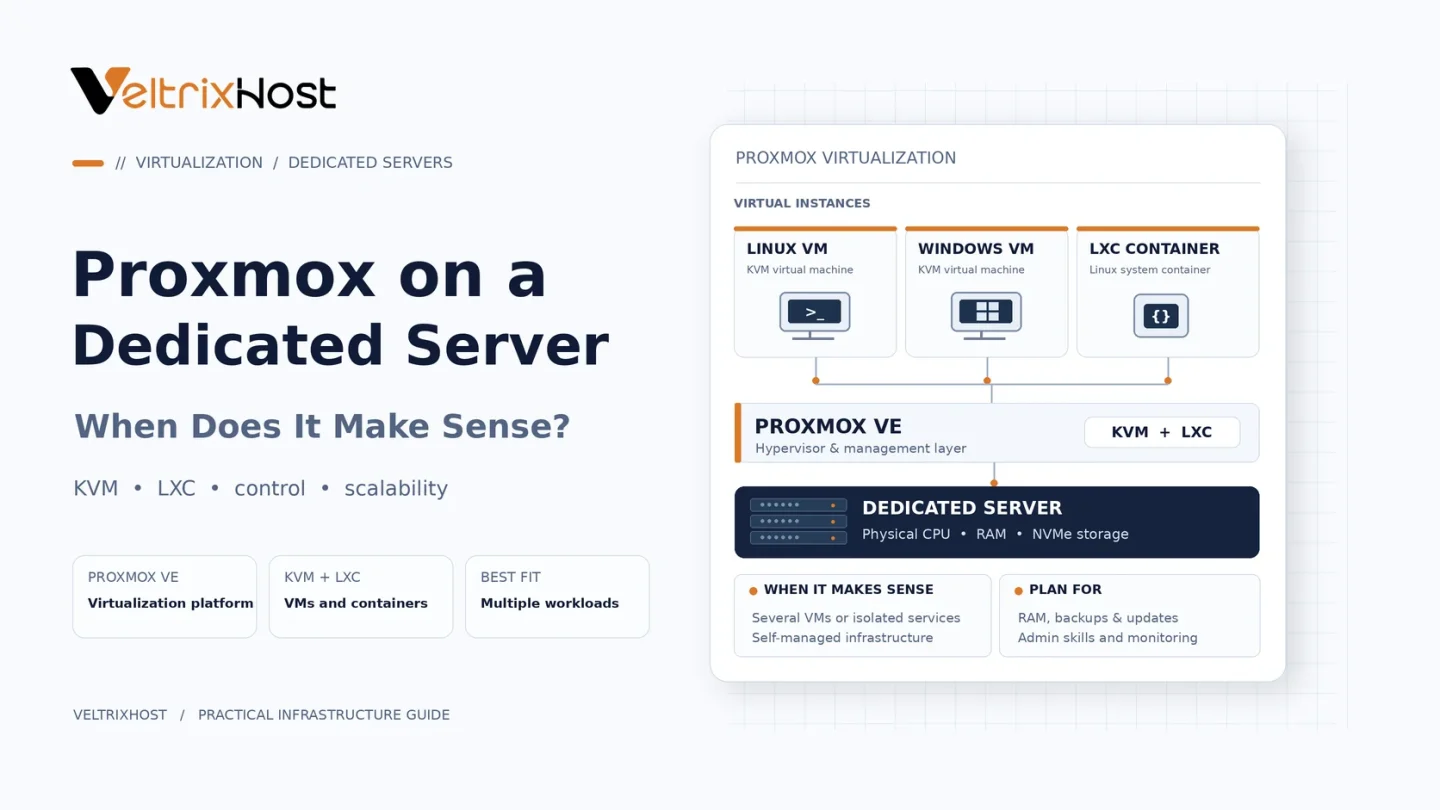
Proxmox Virtual Environment (VE) is an open-source virtualization platform based on Debian Linux.
It combines KVM for full virtual machines and LXC for lightweight Linux containers. Administrators can manage resources, networking, storage, backups, and virtual environments through a web-based interface.
Proxmox supports both Linux and Windows virtual machines, making it useful for different hosting workloads.
Why Run Proxmox on a Dedicated Server?
A dedicated server provides exclusive access to its physical CPU, RAM, and storage resources.
Installing Proxmox allows you to allocate those resources across multiple virtual environments.
This setup is particularly useful for:
- Hosting multiple websites and applications independently.
- Running Linux and Windows virtual machines.
- Creating isolated development and testing environments.
- Managing private VPS infrastructure.
- Consolidating business applications onto one machine.
However, all virtual machines still share the underlying hardware capacity.
Proxmox vs Traditional Dedicated Server Hosting
| Feature | Proxmox Dedicated Server | Traditional Dedicated Server |
|---|---|---|
| Virtual machines | Built-in management | Additional setup required |
| Resource allocation | Divided between VMs | Available to main OS |
| Isolation | Separate virtual environments | Application-level separation |
| Management | Web interface | OS administration |
| Complexity | Higher | Usually lower |
| Best suited for | Multiple workloads | Single major workload |
What Hardware Does Proxmox Need?
Hardware requirements depend on how many virtual machines you plan to operate.
CPU and Virtualization
Choose a processor with sufficient cores and hardware virtualization support, such as Intel VT-x or AMD-V.
More cores help distribute multiple concurrent workloads.
RAM Allocation
Proxmox recommends at least 2GB RAM for the host and its services, plus memory for virtual machines.
For example, a 64GB dedicated server provides more flexibility for several moderately sized virtual machines than an 8GB system.
ZFS and Ceph storage configurations may require additional memory.
Storage and Networking
SSD or NVMe storage helps with virtual machine disk operations.
Consider RAID, redundant storage, network capacity, and additional IP addresses when designing the environment.
Review the official Proxmox hardware requirements before deployment.
When Does Proxmox Not Make Sense?
Proxmox may be unnecessary when you only need one website, database, or application.
A standard Linux installation can be simpler and require less administration.
Additionally, a single Proxmox server remains a single point of hardware failure. True high availability requires suitable additional infrastructure.
Choosing a Dedicated Server for Proxmox
Before purchasing, compare CPU cores, RAM, NVMe storage, IP allocation, network speed, and operating system deployment options.
VeltrixHost Dedicated Servers provide configurable bare-metal infrastructure with full administrative access for compatible virtualization deployments.
Confirm Proxmox installation availability and network configuration requirements before ordering.
Final Recommendation
Proxmox on a dedicated server makes sense when you need multiple isolated environments and centralized virtualization management.
For one straightforward application, a traditional server installation may be easier.
Choose virtualization when its flexibility justifies the additional administration.
FAQs
Is Proxmox free to use?
Yes. Proxmox VE is open-source software, with optional paid subscriptions for enterprise repositories and support.
Can Proxmox run Windows VPS instances?
Yes. KVM supports Windows virtual machines with appropriate resources and licensing.
Is 32GB RAM enough for Proxmox?
It can support several lightweight VMs, depending on their combined memory requirements.
Does Proxmox include backups?
Yes. It includes backup functionality, but independent backup storage and restoration testing remain important.