Running Docker on a VPS can simplify application deployment, testing, and server management. Instead of installing every application directly on your operating system, Docker packages software and its dependencies into containers.
However, Docker is not necessary for every website or project. Understanding when containers provide real benefits helps you avoid unnecessary complexity and hosting costs.
What Is Docker on a VPS?
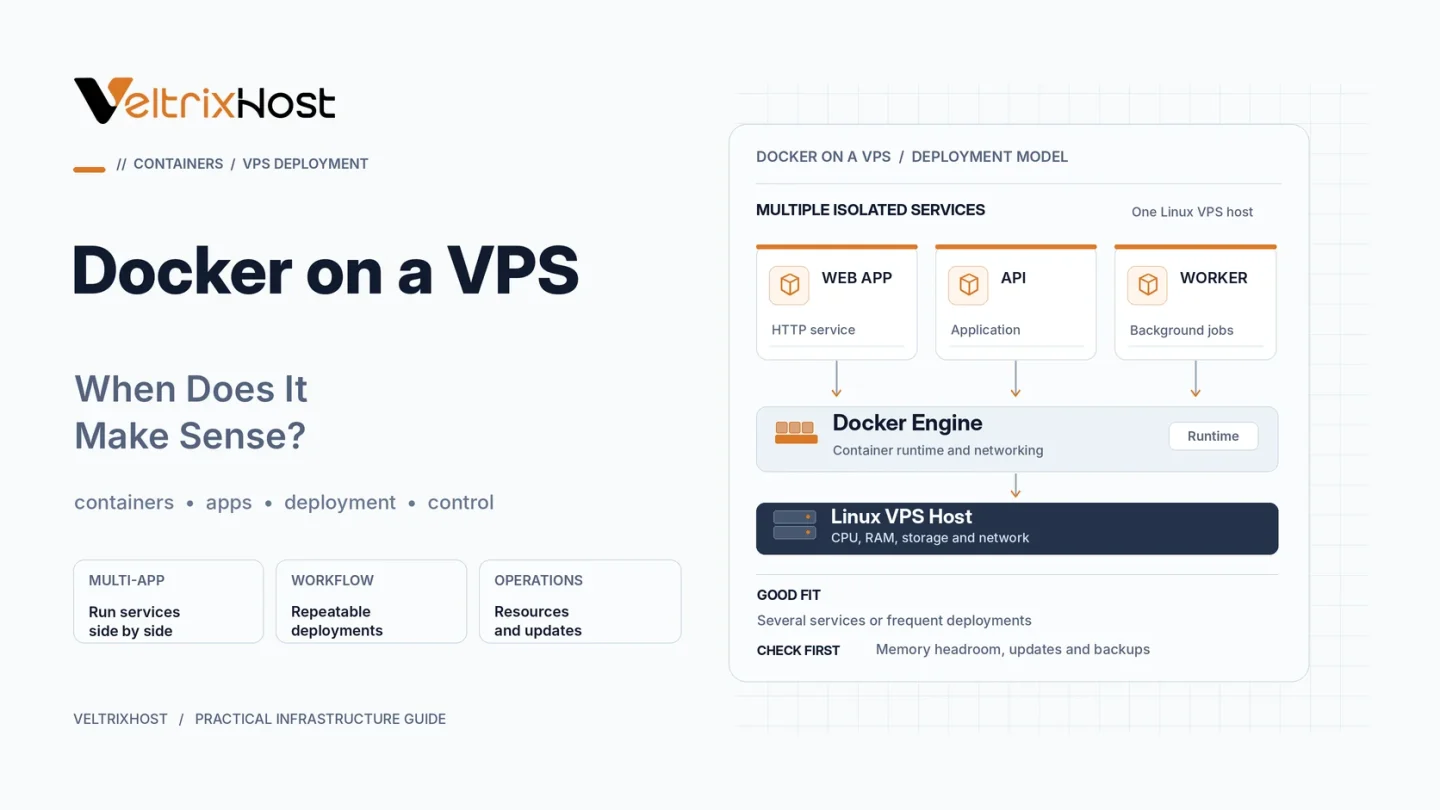
Docker is a containerization platform that allows multiple isolated applications to run on one Linux server.
Containers share the host operating system’s kernel while maintaining separate application environments.
For example, developers can run a Node.js application, PostgreSQL database, and Redis cache in separate containers without installing every component directly on the VPS.
This approach makes deployments more consistent and easier to reproduce.
When Does Docker on a VPS Make Sense?
Docker is particularly useful in the following situations.
1. Hosting Multiple Applications
Containers allow developers to organize applications with different dependencies on the same VPS.
For example, you can host Python and Node.js services without mixing their software environments.
2. Simplifying Application Deployment
Docker images package applications with their required dependencies.
This reduces configuration differences between development, testing, and production environments.
Additionally, Docker Compose helps manage applications containing multiple related services.
3. Running Development Environments
Developers can create temporary environments for testing software updates, database changes, and application configurations.
Containers can be recreated without rebuilding the entire server.
4. Managing Microservices
Docker works well for applications divided into smaller services, such as APIs, background workers, and databases.
However, small projects may not benefit from the additional operational complexity.
Docker vs Traditional VPS Deployment
| Feature | Docker Containers | Traditional Installation |
|---|---|---|
| Application isolation | Container-based | OS configuration |
| Deployment | Reproducible images | Manual or automated setup |
| Dependencies | Separated by container | Managed on host |
| Resource usage | Additional overhead generally low | No container runtime |
| Maintenance | Images and containers | Installed packages |
| Best suited for | Multiple services | Simple applications |
How Much RAM Does Docker Need?
Docker itself is relatively lightweight, but the applications inside containers still consume CPU, RAM, and storage.
For basic testing, a 2GB VPS may be sufficient. Small production applications often benefit from 4GB, while database-heavy or multi-container deployments may require 8GB or more.
These are planning estimates, not fixed requirements.
Monitor usage and configure container resource limits to reduce memory exhaustion.
Important Security and Backup Considerations
Docker does not automatically secure your applications.
Keep images updated, restrict exposed ports, avoid unnecessary privileged containers, and protect access to the Docker daemon.
Use persistent volumes for important application data and maintain independent backups.
The official Docker Compose production guide explains deployment settings, restart policies, and production configuration.
Choosing a VPS for Docker Hosting
Before selecting a server, compare CPU allocation, RAM, storage, root access, networking, and operating system compatibility.
VeltrixHost Linux VPS Hosting provides KVM virtualization, root access, and configurable resources suitable for self-managed container workloads.
Remember that server maintenance, security, and application backups remain your responsibility.
Final Recommendation
Docker on a VPS makes sense when you need repeatable deployments, multiple application environments, or containerized development workflows.
For a single lightweight website, traditional hosting may be simpler.
Choose Docker when its flexibility solves an actual deployment or management problem.
FAQs
Can I run Docker on a Linux VPS?
Yes, if the VPS operating system, kernel, resources, and hosting policies support Docker Engine.
Is 2GB RAM enough for Docker?
It can support lightweight containers, but databases and multiple applications may require additional memory.
Does Docker make a VPS faster?
Not automatically. Docker simplifies deployment and isolation rather than guaranteeing better application performance.
Is Docker suitable for production hosting?
Yes, when properly configured with security controls, monitoring, persistent storage, and reliable backups.